Pages - Menu

Showing posts with label Blogger. Show all posts

Monday, 7 November 2011

Official Blogger iPhone App

Google Blogger has recently released their official iPhone app which allow the users to use Blogger in iPhone, iPod touch or iPad.

With the current version of Blogger iPhone app you can create new post with pictures from your iPhone or you can take new picture directly.

Take have a look at some screen shots below:


You can download the Blogger app for iPhone in Apple App Store.

If you want to play with HTML/CSS codes within the post then this app might not be your choice because its quite hard to type HTML/CSS in the post editor of Blogger iPhone app. Therefore, its better to use Blogger in your PC instead.

Blogger iPhone app needs to be improved and it needs more advance options to make more user friendly. Hopefully, Blogger will release another version of this app soon with more new advanced options and features.

What do you say about this new Blogger iPhone app?

View This Article / Download>>

Wednesday, 3 August 2011

Easy Favicon Implementation in Blogger

Blogger has released another new great feature. This time, the feature allows us to add custom favicon in our blogs. However, we've already got the custom codes in which we can add favicons to Blogger blog adding some lines of code in the template. We're quite little bit fast than Blogger.


Its simple easy to use Blogger's Favicon feature. Just follow the following steps:

Step 1


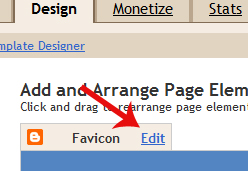
Login to Blogger > Design > Page Element. In the middle of the screen you'll see new 'Favcion' text. Just click 'Edit' button next to it.


Step 2


Now you have to upload your favcion. If you don't have favcion already then you have to create it first. Just use Photoshop or search any suitable icons on the web. I recommend 16x16px size favicon.

Step 3


Once you got it, use click Upload button and choose your favcion file. Once you you, click Save button.

Step 4


Finally, refresh your blog and you'll see new little favicon in your address bar or tab of the browser.

Please note that you'll not have to change the format of favcion. Blogging will automatically do that for you. This is even great feature. From now, if you wanted to change favcion you'll not have to touch any codes.

Enjoy using Blogger!

View This Article / Download>>

Monday, 4 July 2011

Make Your Post Page Title UnClickable in Blogger

You might have seen that the titles of single post of WordPress blog is unclickable. It means URL of the post is disabled in the post titles. This feature is only implemented in post page but not in homepage. Lets take this blog as an example.


First, visit the homepage of this blog, HackTutors. Now, investigate any of the post title. You see the title is clickable and you can easily go inside the post by clicking the title of a post. Now once you are inside the post page, view the post title. Then you see its unclickble. Finally, you can do this in Blogger!

So, lets see how you can do this in few steps.

Step 1:
Go to Blogger > DashBoard > Design > Edit HTML > check Expand Widget Template.

Step 2:
Find the following code. Please note that this code mat not be similar in your template. I use H1 tag. But in your case it might be H2.


Now, replace the above code with the following:


Step 3:
Now save the template and you are done!

Finally you can visit you blog homepage and click on the post title and you'll find that your post title are unclickable in post page.

View This Article / Download>>

Tuesday, 15 March 2011

Blogger will Introduce Awesome Interfaces in 2011 Year!

As a regular Blogger users, we know Blogger released many awesome features in the year 2010. According to blogger buzz, 2010 was a greatest year where they've done many development works for Blogger.


Now, in 2011 Blogger will introduce more awesome interfaces unlike other features. Check out the follow video to get quick view of new Blogger interfaces


Here are some new interfaces which Blogger will introduce:

Post Editor

New post editor seems very attractive and its just like a Microsoft word.

New Dashboard

New blogger dashboard looks like WordPress dashboard.

Content Discovery

Content Discovery feature works as a related content widget.

You can expect these features very soon! What do you think, what must be added more in Blogger?

View This Article / Download>>

Tuesday, 15 February 2011

Add Stylish Subscription Box Below Posts in Blogger

I've been asked, how to place subscription box below each blog post by one of my reader. You can increase your subscriber by placing the subscription box below every post and its best visible. Your visitors and reader can easily find subscription option. Once they come end of the post and if they liked the content then he/she feel it is important to subscribe to your blog.


So, simply I'm going to show you how can you do that one Blogger blogs. If you would like to view demo, watch subscription below this post.


Login to your Blogger account and go to Design > Edit HTML > Check Expand widget template. Find the following code:

Paste the following code just below :

Get Free Updates:
*Please click on the confirmation link sent in your Spam folder of Email*

Replace HackTutors your feed id. Save the template and your just done!

Let me know if you have done this work and show your blog.

View This Article / Download>>

Wednesday, 29 September 2010

3 Blogger Features Missing and Expected by Blogger Users

We all know that Blogger is becoming more smarter but not greater than WordPress. As comparison to WordPress, Blogger is a great blogging service although WordPress is paid self hosting service. But WordPress also provides free hosting and domains.


However, WordPress has all the features that the blogging platform must have. But Blogger users are still expecting some more new amazing features. Check out some cool features which is released by Blogger officially:

  1. Blogger Released new comments System
  2. Blogger Launched 'Share Button' Feature Officially
  3. Get your Complete Blog Stats in your Blogger Dashboard
  4. Blogger Posting Preview now in Main Page and Blogger New Video Player
  5. Blogger post preview before posting, now available!
  6. Blogger launched new Template Designer feature
Blogger is still working on new features that are mostly demanded by Blogger users. Now we will discuss about the features that is not launched but more expected by us. Lets see what is missing on Blogger BlogsSpot.

Commenting System
Blogger has enabled comment form below each post. Actually, the Blogger commenting system is not systematical. If you are WordPress user, then you might know that commenting system is quite well. In WordPress you can reply to all of the comments with the single click button. But in Blogger, we have to use "@" to recognized the person while replying to any comment.

So, Blogger must develop commenting system to make easy.

Widget and Plugins Directories
Blogger have many useful widgets which can be used easily. But blogger doesn't have widget directory where it can be searched and install with on click. If blogger release the separate widget directory, the users can view the widget works properly or not. And we will become free to use and don't have to waste time by searching widgets in Google.

It will be better if anyone can submit the blogger widget if they have any. Check out the Blogger widget created by me:
  1. Adsense Revenue Sharing Widget For Blogger Blogs
  2. Stylish JQuery Featured Post Widget for Blogger
  3. Recent Post Widget for Blogger Using Google API
  4. Fast Loading Recent Posts Widget for Blogger
  5. Placement of Ads or Widgets below the post title in Blogger
Surely, I will submit all of my widgets to the directory if Blogger release it.

PHP with HTML Templates
In all of the Blogger Templates, we can only use HTML and CSS code. What if you can use PHP with HTML and CSS on Blogger Template? No doubt, it will become awesome. In this situation, WordPress users also can get benefits because the Blogger Template will no more remain in XML format.

You know PHP is most developed computer language. Many awesome things can be created with the help of PHP. So, we can't say it is not possible to bring PHP with HTML in Blogger!

Conclusion
So, these are the essential blogger features which are in imagination. If Blogger fulfill these features, it will beat WordPress and gets more and more users that they might not expected!

No doubt if these features enable in Blogger, WordPress users returns again to BlogSpot platform because Blogger is absolutely free blogging platform provided by Google team.

In your opinion, what is the feature that you want to see in future on Blogger?

View This Article / Download>>