Pages - Menu

Sunday, 18 March 2012

6 Best Free Blogger Templates With jQuery Content Slider

This is a guest post contributed by Ammar Ali


 One of the popular features of Blogger Blogspot Templates is the Featured Post Slider or Slideshow Carousal. Today I was searching on internet and best free blogger templates. SO I get and idea of presenting some of them with best jquery content slider and much more features. Here are 5 Best Free Blogger Templates With jQuery Content Slider All the Sliders are created with jQuery which allows some cool features such as the transitions (The effect between each slide).

I had placed all link to download and live demo in image. Click On The Screenshot Of Each Template For The Demo and Download Details.

Glow - Free Premium Blogger Template

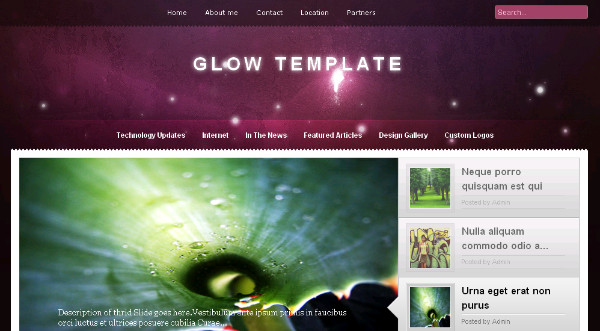
Glow has a beautifully constructed Featured Slider Slideshow.The slides are visible as thumbnails on the left of the full size slider.The template also has a glowing two column magazine design with right sidebar.

Glow - Free Premium Blogger Template

Oracle - Advanced Magazine Blogger Template

Oracle has a beautifully fitted Featured Slider, Image Slideshow with the sides fading away.The slides auto scroll with a manual scroll option.The template also has a two column magazine design with a left sidebar.

Oracle - Advanced Magazine Blogger Template

Nyke - Magazine Blogger Template

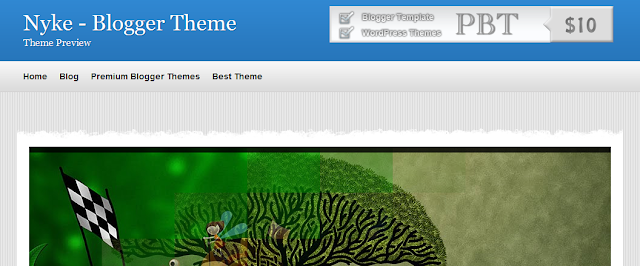
The Featured Slider, Image Slideshow has a very unique rounded bottom and a number of coll transitions between images.The template has a two column layout with right sidebar.

Nyke - Advanced Magazine Blogger Template

MoonLight - Clean Magazine Blogger Template

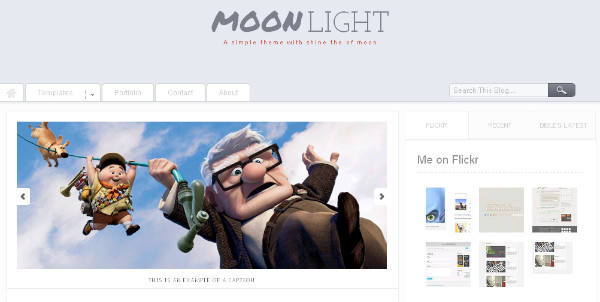
MoonLight - Clean Magazine Blogger TemplateThe Featured Slider, Picture Slideshow on Moonlight has a more simple design but fits neatly above the posts with auto scroll and manual scroll options.The template has a minimalist design with two columns and a right sidebar.
MoonLight - Clean Magazine Blogger Template

 Calenotis - Photographers Magazine Blogger Template

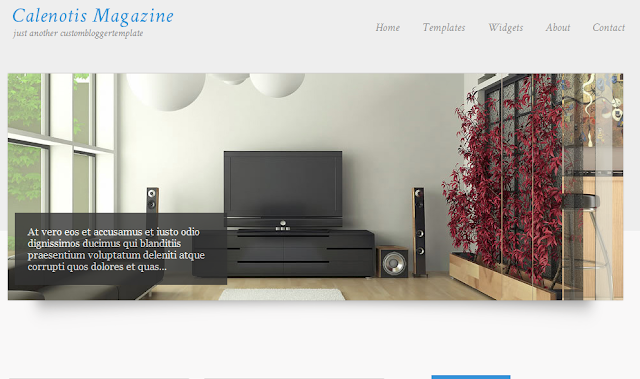
Calenotis has a beautiful full width Featured Slider Slideshow that has a 3D design.The slides are on auto scroll with a number of different transitions.The template also has a professional magazine design with a two column right sidebar layout.

Calenotis - Photographers Magazine Blogger Template

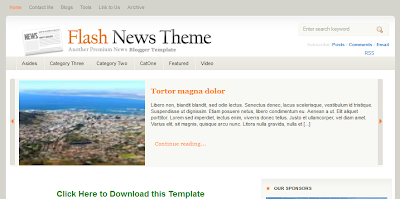
Flash News Blogger Template


Flash news was my last choice (but not least). I found it is very professional blogger template but HackTutors readers haven't covered too much interest on it. Its stylish header may attract your visitor.
Nyke - Advanced Magazine Blogger Template

That's all.Hope you like my collections. Also check out more blogger templates by Hacktutors.

View This Article / Download>>

Saturday, 25 February 2012

Avoiding Some Basic Problems during a Conference Call

There is no hard and fast rule, when it comes to the usage of conference calls. Generally, there can be varied reasons for using conference calls. Moreover, they are not just about communication alone. You can conduct online seminars or you can conduct meetings with people sitting far off places.


Regardless of the reason for the use of conference calls, there is no doubt that during its use you are going to face some problems. By the time you will end up going through this article, you will come to know about techniques to deal with some problems faced during the call.

One of the basic problems you would face while organizing a
conference call is the late arrival of the people. You can consider it as a standard problem in a majority of meetings. However, the probability for the occurrence of this problem during a conference call increases multifold. In a face-to-face meeting you can know that a person is late, if he is actually late and people don’t want to be ashamed being late. However, in case of a conference call, things are different unless you host the call. Even if you are late in this case no one would know. However, if you are firm on the point of timing and keep reminding people time and again, then there are high chances that they will be on time in the meeting. You can have video conferencing in order to avoid this problem.

Yet another common problem during a conference call is the repetitive interruptions due to background noise. For some unknown reasons, despite having used mobile for more than a decade, a majority of people don’t know a proper conference call etiquette of communicating over a conference call. You would often find people talking in their full pitch even in the situation wherein they can be heard just by speaking in a low tone. Before starting the conference call, they don’t bother ensuring that the surrounding is sans any distraction. This is a basic thing, which everyone must know but still you will find it happening in every conference call.

The last but definitely one of the major problems is the lack of active involvement. Most of the people are busy doing something else during a conference call, which acts as a deterrent for a successful call. They aren’t mentally involved in the discussion so there presence is null and void. They can be included in the meeting by having a facilitator who would ensure that everyone is actively involved in the meeting.

View This Article / Download>>

Tuesday, 24 January 2012

Forms That Brings Good Conversions To Your Blogger Page

So you are working hard on your blog, spreading ideas you are passionate about and you need to get in touch with your visitors. Forms are great means of converting casual visitors into engaged audience for your blog. How to put them up on your page?

Forms use server side scripts for submitting data, but as we all know, Blogger does not allow using server-side scripts, which means the mail() function is unaccessible. With no plugin or widgets either, the only way of creating and running a form for Blogger is to use an external service that provides the needed scripts. Which is good news, because most often form builders come with a bunch of great extra features to boost the usability of your forms. 123ContactForm is one effective web form builder that helps you create and administrate all types of forms and surveys for Blogger.

All submitted info is stored securely for you on the 123ContactForm servers, where you can access it with any query.


For better conversions as well as for making your life easier, here are some features to look for in your forms for Blogger:

- Nice skin. Forms can be styled in any possible way, as 123ContactForm allows full CSS
customization. Make them blend with the image of your blog.

- 3rd party apps to extend the capabilities of forms. A wide range of integrations is available:
SalesForce (adds leads to the account for sales purposes), MailChimp (imports the contacts in forms for using them in e-mail campaigns), WebHooks (for manipulating the behaviour of forms and
submitted data), Yahoo and Google Groups, VerticalResponse, iContact.

- E-mail notifications. With 123ContactForm you can have the information collected through the webforms sent to you via email. All the data, including uploaded files, is there. In case the total size of the uploaded files is larger than 5MB, they will be sent as attachments instead of download links)

- Data export. This form generator exports submissions to neat CSV sheets that may be called later for database purposes.

- Reports over data. This can be a very useful tool for dedicated marketeers. Instead of having a long list of submissions that they have to analyse later with dedicated software such as SPSS, reports are ready in a minute without them getting hands dirty with raw data.

Creating forms for Blogger

It takes no more than 5 minutes, just follow these steps:

1. Sign up/Log in to www.123contactform.com.

2. In your dashboard, go to Create New Form and choose the type of form needed: contact form,
event registration form, order form, survey.


3. Edit form fields.

4. Choose Settings - the e-mail address for notifications, payment integration for order forms, 3rd party apps you wish to integrate with your form.

5. Last step - Get code & Publish. Choose the Blogger tab, copy the code given and paste it into your Blogger post (in HTML view).


And voila! Here is your fresh form ready to use. Forms are very handy tools to help you out in a variety of situations. If you are a new blogger needing a hatful of contacts for sending newsletters, just put up a simple contact form with opt-in fields for the users to choose the sections that interest them. You can perform surveys for gathering feedback from customers (online product surveys, business demographics, customer satisfaction surveys). Or you can sell and receive payments through order forms. All you need is the idea, tools are at hand!

View This Article / Download>>

Tuesday, 3 January 2012

Social Bookmarking Buttons With Spinning Effect for Blogger

Till now many social bookmarking widgets has been released for Blogger. Simply, social bookmarking buttons and icons helps you to make your blog socialize and get more traffic. Adding social bookmarking buttons is cool way to get more readers and targeted audience.


Before using social bookmarking option, you must be aware of icons design how much clickable is it. Your readers are likely to click social bookmarking button containing in your blog if they find the buttons really cool. If you haven't such buttons, so here is something special for you.

Social bookmarking buttons with spinning hover effect. Buttons are cool itself and when your reader hover the mouse over it, it spins a round.

Check the demo yourself!

Here is how to add these cool buttons to your Blogger blog:

Login to Blogger > Design > Edit HTML > Expand widget templates. Find the following code in your template:


Just below that add the following group of codes:


Replace hacktutors with your feedburner username. Again, find the following code:

]]>

Just above that code, past the following:


.spinning_icons a{
    width:48px;
    height:48px;
    display:inline-block;
    text-indent:-9999em;
    background-position:0 0;
    background-repeat:no-repeat;
    z-index:2000;
    overflow:hidden;
}
.twitter{ background:url('https://blogger.googleusercontent.com/img/b/R29vZ2xl/AVvXsEjrS5i_DuUoHLvkidVsVXNLUqEez1AGAFxMKv95t5yw-JwAEfuTKSF_wvxJD_H_hdIK4vi-G8yrREUxtR0o1I_jHDfjKFcpLNlouGO-WgdUrNExc3LTNWt-ipAcZ-wl4IdVXjmnOWSSct8/s1600/twitter_32.png'); }
.delicious{ background:url('https://blogger.googleusercontent.com/img/b/R29vZ2xl/AVvXsEiGIuyqo_Vl04O3Usx5UDOjsI9LHfaSDUIsbhftxDYN4q4Qztj-CSFs5GmTgVZwUGbaRWSTHTjVUGe28mdGgfy_nC82IbifTK8JnWIDWEbkc3OIRxZGFMc9PiJlsnRXd7r4JVucirXS1Uc/s1600/delicious_32.png'); }
.digg{ background:url('https://blogger.googleusercontent.com/img/b/R29vZ2xl/AVvXsEimZfDF3rZ2tfU8BE4zzhtrpKHoZKqEuqD-u-3SNpDRi2M5RLImT66pRiV8yT30VWuTvE9ItH-rokFkdOjGAzQqxVix6FpsLHO8KiJEbNJwOL1vsq88p9PONARbk1HQjAMueo5EjIbA-eg/s1600/digg_32.png'); }
.facebook{ background:url('https://blogger.googleusercontent.com/img/b/R29vZ2xl/AVvXsEjHpsan87iIDtBg4kqI3qz76Ptax_l2nvu027KCBYWGCFLe1Hqiuwf8oXrFJIILkNKnI2Fo7mRvaB5IrVVAoiLvE4yqa2D47_61VpJL3n1jPGqfSW7O-fjPzifyoEXvkACFDKyv-Ej5EN4/s1600/facebook_32.png'); }
.rss{ background:url('https://blogger.googleusercontent.com/img/b/R29vZ2xl/AVvXsEi3660MX4gbGRyCCx2nR-nW6MGTHj41JLT08m1qqkDdIogZg6QaJ43KAGZWqdPtHpiZLI7Zs31nh9WER0fwxUlhnk4Ol7bBD55MKc52iRX2V_lzAhNtN-zfiu_NXiG6ZIviHdzjOLlGNz4/s1600/rss_32.png'); }
.stumbleupon{ background:url('https://blogger.googleusercontent.com/img/b/R29vZ2xl/AVvXsEjB7RKfKrsOcbO5lS89rFeUMLO7nbaO6xKq9dM9Nx9ozZ4Quc8j-XDMAWOu0_xaYIpDYm0wsbuMiQUiJ76BWUroeY3NEB_imliy7bAIumaz9XycHXrBvjfCUauy1p4w06kKOakT8snGWLk/s1600/stumbleupon_32.png'); }
.spinning_icons a:hover{
    transform: rotate(360deg);
    -webkit-transform: rotate(360deg);
        -moz-transform: rotate(360deg);
    transition: transform 0.2s ease-out;
    -webkit-transition: -webkit-transform 0.2s ease-out;
        -moz-transition: -moz-transform 0.2s ease-out;
}

Now save the template and your are done! Have a look at your cool new bookmarking button that appears at the bottom of your post.

Thanks to Paulund for this cool CSS3 bookmarking button spinning effect.

View This Article / Download>>

Monday, 7 November 2011

Official Blogger iPhone App

Google Blogger has recently released their official iPhone app which allow the users to use Blogger in iPhone, iPod touch or iPad.

With the current version of Blogger iPhone app you can create new post with pictures from your iPhone or you can take new picture directly.

Take have a look at some screen shots below:


You can download the Blogger app for iPhone in Apple App Store.

If you want to play with HTML/CSS codes within the post then this app might not be your choice because its quite hard to type HTML/CSS in the post editor of Blogger iPhone app. Therefore, its better to use Blogger in your PC instead.

Blogger iPhone app needs to be improved and it needs more advance options to make more user friendly. Hopefully, Blogger will release another version of this app soon with more new advanced options and features.

What do you say about this new Blogger iPhone app?

View This Article / Download>>

Wednesday, 21 September 2011

4 Tips for Gaining Influence on Social Networks

If you are serious about blogging, you are probably also serious about promoting your blog such that your influence on the Internet grows. The two most popular and, not to mention, economical, mediums for any type of Internet promotion, whether it's promoting your blog or a business, are Twitter and Facebook. Other similar social media platforms are also important, but for now, these are the main players. Gaining influence on these networks can sometimes seem like an impossible undertaking, but here are a few things to consider.

Don't talk about yourself all the time
A recent article featured on Brian Solis, a blog about media and influence, features some revealing statistics about how self-referential tweets on Twitter can lower your chances of being re-tweeted, which is a standard way to gauge your influence on Twitter. Not only that, but analysis on the article also shows that as the number of self-referential tweets increases the number of followers decreases.

Be current, entertaining, or informative
The same Brian Solis article shed light on one more factor that affects influence on Twitter, specifically—subject matter. The type of content that was most retweeted was news. The second most influential subject matter was instructional content, while the third most influential, as gauged by retweets, was entertainment. As such, if you want more people to be exposed to your content, stay away from only promoting products, purveying your personal opinion, or talking about your daily life.

Don't just target the biggest influencers
Smart Blogs recently featured an interview with a Technorati Media President Charles Black, who discussed social media and effective social networking. Black noted that it is more important to target and seek the influence of "mid-tail" or "magic middle" bloggers than the biggest bloggers, simply because even though top bloggers have more followers, mid-level bloggers have more influence because they are closer and more in touch with their audience.

Be trustworthy and credible
Although this may sound a bit hokey, the most important factor in gaining influence in social media, and the blogosphere generally speaking, is to maintain your credibility and trustworthiness. As such, any time you post anything, whether it is on Twitter, Facebook, or your blog, and you are representing ideas or products that you would like to promote, be sure to double-check any assertion you make. Followers aren't necessarily your friends, so if you are wrong about something, they won't be so forgiving. They can simply go elsewhere to find someone who is more credible than you are.

Of course, these aren't the only ways to ensure a stronger following on social networking sites, but they are definitely a start. Above all, trust your readers, followers, and users. Always put them first.

This guest post is contributed by Lauren Bailey, who regularly writes for best online colleges.

View This Article / Download>>

Thursday, 15 September 2011

Things to Keep in Mind Before Choosing a Web Hosting Company

Web hosting is the process of storing files on a server so as to be made available on the internet. Many individuals and companies, both big and small, always maintain an online presence in the form of a website or blog. In the case of a company, it is very important to have a website on the internet because it is a means through which the business can be expanded through more sales. Today, having a website is now seen as a very important part of operating a business.

Choosing a reliable web hosting company can be sometimes tricky. There are hundreds of companies which offer web hosting services. It is very important to think about some things while choosing a web hosting company because this can bring a lot of difference as far as company's profit is concerned. Some of the things to keep in mind before choosing a web hosting or canada web hosting company are:


Technical support: When you have a website, things can go wrong any time. Therefore, it is of utmost importance to choose a hosting company that will be able to help you out in terms of technical issues. A good company should be able to provide 24/7 technical support through live chat so as to quickly get your problem solved.

Reliability: you should choose a web hosting company that has reliable service. Online visitors should be able to access your website any time. Do not choose a cheap web hosting company whose servers are always down every now and then. A good indication of this can be found out by checking out web hosting reviews online. Of course, there are cases in which the best hosting companies' servers can also go down but thats rare and its not long before they are up again.

Website building software: Through the control panel or what we commonly known as Cpanel, a web hosting company should have a website building software or in other words website builder, especially for those who do not have programming knowledge. This is going to save you a lot of money because you would not need to hire a website designer.

Number of domains to be hosted: Sometimes one domain alone doesn't serve the purpose of an individual or a company. In this case, you need to make sure how many domains does the web hosting company allow.

Control panel: aAuser-friendly control panel is very important with any web hosting account. Therefore, make sure that the company has the ones which do not require you to spend too much time in learning how to use them. Most of the web hosting companies now have a demo login feature so you can check that out. An example of a good and user friendly cPanel must have a software like Fantastico, which enables you to create WordPress blogs very easily.

If you have the intention of creating a shopping portal or online store, make sure that the web hosting company offers SSL. Secure Sockets Layer (SSL) is the transactional security protocol which is used by many websites in protecting their online activity including online transactions etc.

MySQL Databases: Databases are important in the creation and management of websites. If you need a web hosting account for business, make sure that the company enables you to have enough databases.

A good way of paying less for a web hosting account service is to pay in advance. There are some hosting companies which allow you to pay for a period of 12 and 36 months. Not only that; you will also be given a money-back guarantee of about 30 days. With such hosting plan, you can always make your business grow.

View This Article / Download>>